SSI Traffic Solutions: Traffic Safety Products in USA and Canada
Traffic Safety Products in USA and Canada

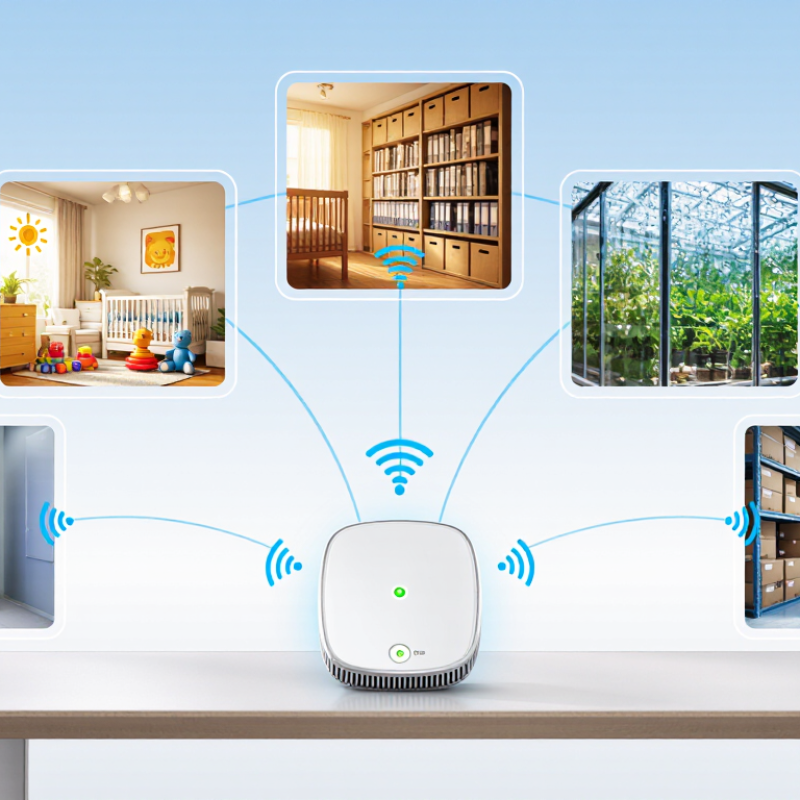
A WiFi Humidity Sensor turns invisible moisture into practical, timely information. It can monitor a nursery, archive room, greenhouse, server cabinet, or storage area without constant manual checks. When humidity rises near a cardboard box or cool metal surface, the sensor can send an alert before mold, corrosion, or product damage becomes obvious.
Kevin Ashton, a technology strategist widely credited with coining the term “Internet of Things,” said, “The Internet of Things has the potential to change the world, just as the Internet did. Maybe even more so.” His observation explains why connected environmental monitoring matters. A WiFi Humidity Sensor does more than display a percentage. It creates a record, supports quicker decisions, and helps people notice gradual changes that ordinary inspections may miss.
The benefits are practical. Users can view readings remotely, compare daily patterns, and receive notifications when humidity exceeds a chosen range. Installation is often simple. However, convenience should not replace judgment. Wi-Fi can fail. Batteries can weaken. Poor sensor placement can produce misleading readings near vents, windows, or damp surfaces. Calibration also deserves attention, especially in sensitive storage environments.
A reliable system combines accurate hardware, stable connectivity, clear data, and regular maintenance. It should be checked against a trusted reference when conditions matter. That extra step is easy to overlook. Still, it can separate useful monitoring from false confidence. Choosing a WiFi Humidity Sensor means choosing earlier visibility, not perfect certainty.
Why Choose a WiFi Humidity Sensor for Smart Monitoring?
A WiFi humidity sensor measures relative humidity and sends readings through a wireless network. This allows remote monitoring from a phone or computer. ASHRAE recommends maintaining indoor relative humidity between 30% and 60%. This range supports comfort and helps reduce conditions linked to mold growth and excessive dryness. A sensor can reveal changes before people notice them. For example, a storage room may reach 68% RH overnight, while daytime readings seem normal. Continuous data exposes that hidden pattern.
Tips: Place the sensor away from windows, vents, heaters, and direct sunlight. These locations can distort readings. Check its accuracy against a trusted reference when possible. Set alerts near 30% and 60%, but avoid treating these limits as absolute. Building materials, climate, and room use also matter.
WiFi monitoring is useful for basements, archives, bedrooms, and equipment rooms. Historical graphs help identify leaks, poor ventilation, or seasonal shifts. However, no sensor is perfect. Network failures, weak batteries, and poor placement can create misleading gaps. A precise-looking number may still need inspection. Use the data with regular visual checks, especially around corners, pipes, and cold surfaces. The best decision comes from both measurements and context.
| Monitoring Dimension | Relative Humidity Range or Requirement | What It Indicates | Recommended WiFi Monitoring Action |
|---|---|---|---|
| Preferred indoor range | 30%–60% RH | A commonly recommended range for occupied indoor environments. ASHRAE guidance identifies 30%–60% RH as a suitable range for many indoor applications. | Create a normal operating zone and display the current reading on a dashboard. |
| Low humidity | Below 30% RH | Dry air may increase discomfort, static electricity, and moisture loss from some materials. | Send a low-humidity alert and check ventilation, heating, or humidification settings. |
| Elevated humidity | Above 60% RH | Moisture-related risks become more likely, particularly in poorly ventilated or cool areas. | Trigger a warning after a sustained exceedance and inspect ventilation or dehumidification. |
| High humidity | Above 70% RH | Persistent high humidity can support mold growth on suitable damp surfaces and may damage moisture-sensitive contents. | Send a high-priority alert, record the duration, and investigate leaks, condensation, or inadequate air exchange. |
| Temperature compensation | Record temperature together with RH | Relative humidity changes with temperature, so an RH value is more useful when its corresponding temperature is known. | Use a combined temperature-and-humidity sensor and display both readings in the same record. |
| Condensation risk | Surface temperature at or below the dew point | Water can condense when a surface becomes colder than the surrounding air’s dew point, even if room RH is within the preferred range. | Use temperature and RH data to calculate dew point and monitor cold walls, pipes, windows, or equipment. |
| Measurement accuracy | A practical general-purpose target: approximately ±3% RH | Higher accuracy improves confidence near alert thresholds. Actual performance depends on the sensor, temperature, and calibration. | Select a sensor with documented accuracy across the intended temperature and RH range. |
| Sampling and reporting | Configurable intervals, such as 1–15 minutes | Shorter intervals capture rapid changes, while longer intervals can reduce network traffic and battery use. | Choose the interval according to the environment, asset sensitivity, and required response time. |
| Alert logic | Use threshold plus persistence time | A brief humidity spike may be normal, while a sustained deviation is more likely to require action. | Add a delay, such as 5–15 minutes, before sending an alert to reduce nuisance notifications. |
| Remote visibility | Live readings, historical trends, and notifications | A WiFi humidity sensor transmits measurements to a connected platform, enabling monitoring without being physically present. | Use dashboards, trend charts, and email or mobile notifications for faster response and record keeping. |
| Calibration and placement | Follow the device instructions and avoid direct heat, sunlight, vents, and water spray | Incorrect placement or sensor drift can produce misleading readings. | Check readings periodically, compare with a trusted reference when needed, and place the sensor where representative air conditions can be measured. |
Note: Alert thresholds should be adjusted for the building, climate, contents, and applicable operating requirements. The 30%–60% range is general indoor guidance and is not a substitute for application-specific standards or professional assessment.
A WiFi humidity sensor turns changing moisture levels into useful, remote information. Inside the device, a capacitive sensing element contains a moisture-sensitive dielectric layer. As humidity rises, the layer’s electrical properties change. The circuit measures this capacitance and converts it into relative humidity.
The reading is then sent through a WiFi connection to a monitoring platform. In a practical test, a sensor near a bathroom window reported quick humidity increases after a shower. The cloud system compared the reading with a chosen threshold and sent an alert when moisture stayed high. This helps users respond before condensation damages walls, stored materials, or electronic equipment.
Cloud monitoring is convenient, but it is not flawless. WiFi interruptions can delay updates, so local data storage is valuable. Sensor placement also matters; direct sunlight, vents, and wet surfaces may distort readings. Calibration should be checked against a trusted reference, especially in laboratories or storage rooms. I once saw a sensor report unusually dry air because it sat beside a warm power adapter. The device was working, but the installation was poor. Alerts also need sensible limits. A threshold set too low can create constant notifications and encourage users to ignore important warnings. Secure passwords, encrypted transmission, and controlled account access add practical protection. Even accurate hardware needs regular inspection.
24-hour indoor relative humidity profile with a 60% cloud-alert threshold
A capacitive humidity sensor detects changes in the dielectric properties of its moisture-sensitive layer and converts them into relative humidity readings. The device transmits measurements through WiFi, while cloud rules can issue an alert when humidity remains above the configured threshold. Indoor humidity is commonly maintained around 30–60% RH for general comfort and moisture control.
A WiFi humidity sensor supports continuous monitoring without requiring someone to check the room repeatedly. It sends readings through a wireless network to a phone or computer. This creates 24/7 remote visibility for homes, archives, laboratories, and storage areas. No site visit is required. When humidity crosses a chosen limit, an instant notification can prompt a quick response. Staff may then inspect ventilation, move sensitive materials, or investigate a leak before damage spreads.
In practical use, sensor placement matters as much as the software. A unit near an air vent may report unusually dry conditions, while one beside a damp wall may exaggerate local moisture. I have found that placing sensors at breathing height, away from direct airflow, produces more useful readings. Small details matter. A clear dashboard can also reveal gradual changes, such as humidity rising every night after heating stops. That pattern is often more valuable than one isolated alert.
Reliable monitoring still needs human judgment. Sensors should be checked against a trusted reference and recalibrated when readings seem unusual. WiFi interruptions, weak signals, and low batteries can create blind spots. The system is not magic. Alert thresholds also need review because overly sensitive settings may cause notification fatigue. A thoughtful setup combines remote access, visible trends, timely alerts, and occasional on-site verification. Even then, every installation has limits worth questioning.
Indoor humidity affects comfort, sleep, and the condition of your home. The EPA advises keeping indoor humidity between 30% and 50%. Below this range, dry air may irritate skin, eyes, and breathing passages. Above it, moisture can encourage mold growth and dust mites.
A WiFi humidity sensor makes this range easier to watch throughout the day. Place one in a bedroom, nursery, basement, or bathroom. It can send readings to a phone when humidity rises after a shower or drops during winter heating. This detail is useful because a wall gauge may miss changes in another room. Small changes matter.
Use the readings with practical checks. Open a window when outdoor air is suitable. Run an exhaust fan during bathing. A humidifier may help during dry weather, but cleaning it is essential. I have found that sensor alerts can reveal patterns, not just single numbers. Still, technology is not perfect. Sensors need correct placement, fresh batteries, and occasional comparison with another reliable meter. A reading near 50% should not create false confidence, especially when condensation appears on windows or behind furniture. Real rooms are uneven. Temperature, airflow, and building materials can change the result.
A WiFi humidity sensor is useful when it turns a hidden problem into a visible trend. Moisture can damage archives, trigger mold, or disturb greenhouse conditions. However, a low price does not guarantee dependable readings. Check accuracy across the temperatures you actually experience, not only the ideal laboratory point. Look for a stated relative-humidity tolerance, calibration method, and response time. A sensor reading of 55% RH may be misleading if the device sits beside a cold window.
Security deserves equal attention. The 2024 Verizon Data Breach Investigations Report found that the human element appeared in 68% of breaches. Choose secure account controls, encrypted communication, signed firmware updates, and unique passwords. NISTIR 8259A recommends clear cybersecurity capabilities for connected devices, including data protection and secure software updates. Integration also matters. Confirm support for your existing dashboard, alerts, automation rules, and local network settings. IoT Analytics reported about 18.8 billion connected IoT devices worldwide in 2024, yet more connections can create more failure points. WiFi coverage may look strong, but walls, interference, and router changes can interrupt records.
Tips: Test two sensors side by side for seven days. Place them away from vents and direct sunlight. Check battery decline after frequent alerts. Longer battery life often requires fewer transmissions, but slower updates may miss sudden moisture spikes. Keep a calibration log, even if it feels excessive. No sensor is perfect. I would still question unusually stable readings; real rooms usually fluctuate.